...
| Table of Contents | ||||
|---|---|---|---|---|
|
...
1. Installation
Synap Editor SynapEditor installation package is comprised of the following components.
- Synap Editor SynapEditor + Import Module
- SynapEditor_2.x.x.zip
- Fonts for metafile conversion
- fonts.zip
...
| Path | Content | Explanation |
|---|---|---|
/workspace/SynapEditor_2.x.x/SynapEditor |
| externals : External module directory plugins : Plugin directory license.json : License file synapeditor.config.js : Configuration file synapeditor.min.css, synapedtiro.min.js : Synap EditorSynapEditor synapeditor.pkgd.min.css, synapeditor.pkgd.min.js : Synap Editor SynapEditor including external modules and plugins |
| /workspace/SynapEditor_2.x.x/sedocConverter | Windows
Linux
| Import module (execution file) Windows : sedocConverter.exe and multiple dll files Linux : sedocConverter_exe |
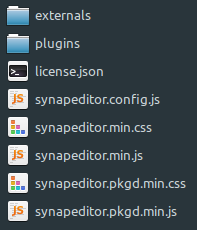
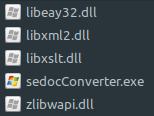

...
| Code Block | ||||||||
|---|---|---|---|---|---|---|---|---|
| ||||||||
{
   /**
     * Set up the path or object for the license file
     * ex) '/synapeditor/license.json'
     * ex)  {
                'company': 'SynapSoft',
                'key': [
                    'licenseKey'
                ]
            }
     */
    'editor.license': 'synapeditor/license.json',
  ...
} |
3. 3. Initializing Synap Editor SynapEditor and Saving Edited Contents
Incorporating Synap Editor SynapEditor into your own environment is also very simple and straightforward.
You can use either <div> or <textarea> tag for the instantiation of Synap EditorSynapEditor.
3.1 Using <div> tag
3.1.1 Include js and css file for Synap Editor with for SynapEditor with <script> and <link> tags
| Code Block | ||||||
|---|---|---|---|---|---|---|
| ||||||
<link href='synapeditor/synapeditor.min.css' rel='stylesheet' type='text/css'> <script src='synapeditor/synapeditor.config.js'></script> <script src='synapeditor/synapeditor.min.js'></script> |
3.1.2 Create new Synap Editor SynapEditor instance using <div> tag
| Code Block | ||||||
|---|---|---|---|---|---|---|
| ||||||
<!DOCTYPE html>
<html lang="ko">

<head>
<meta charset="utf-8">
<meta http-equiv="X-UA-Compatible" content="IE=edge">
<meta name="viewport" content="width=device-width, initial-scale=1.0, minimum-scale=1.0, maximum-scale=1.0, user-scalable=no, shrink-to-fit=no">
<title>Synap Editor | Unlimited Rich Text Editor</title>

<link href="synapeditor/synapeditor.min.css" rel="stylesheet" type="text/css">
<script src="synapeditor/synapeditor.config.js"></script>
<script src="synapeditor/synapeditor.min.js"></script>
<script>
function initEditor() {
	var se = new SynapEditor("synapEditor", synapEditorConfig);
}
</script>
<body onload="initEditor();">
	<div id="synapEditor"></div>
</body>
</html> |
...
3.2.1 Include script and css file for Synap Editor with for SynapEditor with <script> and <link> tags
| Code Block | ||||||
|---|---|---|---|---|---|---|
| ||||||
<link href='synapeditor/synapeditor.min.css' rel='stylesheet' type='text/css'> <script src='synapeditor/synapeditor.config.js'></script> <script src='synapeditor/synapeditor.min.js'></script> |
3.2.2 Create new Synap Editor SynapEditor instance using <textarea> tag
...
You can add the various plugins provided by Synap Editor SynapEditor as follows.
Please refer to Plugin page for more detailed information.
| Excerpt Include | ||||||
|---|---|---|---|---|---|---|
|
Applying External Modules
...