...
| Code Block | ||||||
|---|---|---|---|---|---|---|
| ||||||
{
	"editor.toolbar": ["new","open","|", "paragraphStyleWithText", "|", "fontFamilyWithText", "|","fontSizeWithText", "|","bold", "italic", "underline", "strike", "|","fontColor", "fontBackgroundColor"]
} |
| TOOLBAR KEY | ICON | 설명 |
|---|---|---|
| new |
| 편집중인 내용을 모두 지우고 새문서를 만든다. |
| open |
| 문서를 임포트한다. |
| 인쇄를 한다 | |
| pageBreak |
| 인쇄시 사용되는 페이지 구분자를 추가한다 |
| template |
| 템플릿 다이얼로그를 연다 |
| autoSave |
| 자동저장된 문서목록을 불러온다 |
| undo |
| 실행취소 |
| redo |
| 재실행 |
paragraphStyle |
| 문단스타일을 지정한다 (P, H1 ~ H6) |
paragraphStyleWithText |
| 문단스타일 지정버튼을 드롭다운 형태로 보여준다 |
fontFamily |
| 글꼴을 설정한다 |
fontFamilyWithText |
| 글꼴설정 버튼을 드롭다운 형태로 보여준다 |
fontSize |
| 글자크기를 설정한다 |
fontSizeWithText |
| 글자크기 설정버튼을 드롭다운 형태로 보여준다 |
| customParagraphStyle |
| 사용자정의 문단스타일을 보여준다. 사용자정의 문단스타일은 config에 설정해야한다. |
| customRunStyle |
| 사용자정의 글자스타일을 보여준다. 사용자정의 글자스타일은 config에 설정해야한다. |
| growFont |
| 글자크기를 한단계 키운다. |
| shrinkFont |
| 글자크기를 한단계 줄인다. |
| bold |
| 굵게 |
| italic |
| 기울임 |
| underline |
| 밑줄 |
| strike |
| 취소선 |
| superScript |
| 위첨자 |
| subScript |
| 아래첨자 |
| fontColor |
| 글자색 |
| fontBackgroundColor |
| 글자배경색 |
| align |
| 문단정렬 (left, center, right, justify) |
| copy |
| 복사 |
| cut |
| 잘라내기 |
| paste |
| 붙여넣기 |
| copyRunStyle |
| 서식복사 |
| pasteRunStyle |
| 서식붙여넣기 |
| removeRunStyle |
| 서식지우기 |
| link |
| 링크 |
| unlink |
| 링크해제 |
| table |
| 표 삽입 |
| image |
| 이미지 삽입 |
| background |
| 문서 배경 이미지 및 색 지정 |
| video |
| 동영상 삽입 |
| file |
| 파일 삽입 |
| horizontalLine |
| 가로줄 삽입 |
| specialCharacter |
| 특수문자 삽입 |
| emoji |
| 이모지 삽입 |
| div |
| 레이어 삽입 |
| drawDiv |
| 레이어 그리기 |
| quote |
| 인용문구 삽입 |
| bulletList |
| 글머리 기호 |
| numberedList |
| 글머리 번호 |
| multiLevelList |
| 다단계 글머리 |
| increaseIndent |
| 들여쓰기 |
| decreaseIndent |
| 내어쓰기 |
| lineHeight |
| 줄간격 |
| lineHeightWithText |
| 줄간격 버튼을 드롭다운 형태로 보여준다. |
| paragraphProperties |
| 문단 상세속성 편집 |
| fullScreen |
| 전체화면 |
| source |
| 소스보기 |
| preview |
| 미리보기 |
| ruler |
| 줄자 |
| divOutline |
| 레이어 외각선 보이기/감추기 |
| accessibility |
| 웹접근성 검사 |
| personalDataProtection |
| 개인정보보호 (검출) |
| find |
| 찾기/바꾸기 |












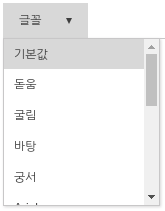
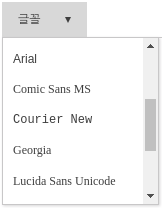
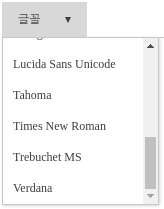
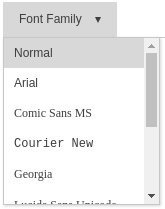
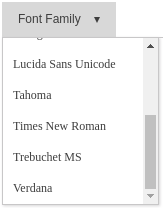
글꼴 목록
| Status | ||
|---|---|---|
|
...
| Code Block | ||||||
|---|---|---|---|---|---|---|
| ||||||
{
	"editor.fontFamily": {
		ko:	 [
        	'돋움', '굴림', '바탕', '궁서',
	        'Arial', 'Comic Sans MS', 'Courier New', 'Georgia',
	        'Lucida Sans Unicode', 'Tahoma', 'Times New Roman', 'Trebuchet MS', 'Verdana'
	    ],
	    en: [
	        'Arial', 'Comic Sans MS', 'Courier New', 'Georgia',
	        'Lucida Sans Unicode', 'Tahoma', 'Times New Roman', 'Trebuchet MS', 'Verdana'
	    ]
	},
} |
| 한국어일 때 (ko) | 영어일 때 (en) |
|---|---|
|
|
메뉴 설정
"editor.menu.show"키로 메뉴 사용여부를 결정한다.
...
| Code Block | ||||||
|---|---|---|---|---|---|---|
| ||||||
{
	"editor.menu.definition": {
    	"file": [
	      "new",
	      "open",
	      "-",
	      "template",
	      "autoSave",
	      "print",
	      "pageBreak"
	    ],
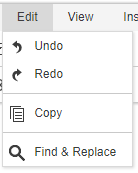
	    "edit": [
	      "undo",
	      "redo",
	      "-",
	      "copy",
	      "-",
	      "find"
	    ],
	    "view": [
	      "fullScreen",
	      "-",
	      "source",
	      "preview"
	    ],
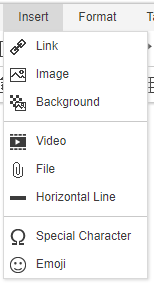
	    "insert": [
	      "link",
	      "image",
	      "background",
	      "-",
	      "video",
	      "file",
	      "horizontalLine",
	      "-",
	      "specialCharacter",
	      "emoji"
	    ],
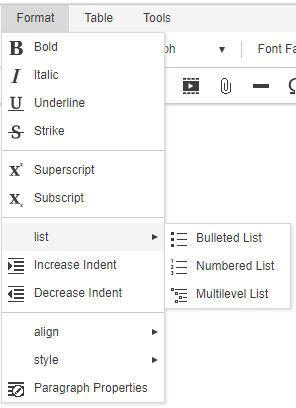
	    "format": [
	      "bold",
	      "italic",
	      "underline",
	      "strike",
	      "-",
	      "superScript",
	      "subScript",
	      "-",
	      {
	        "groupName": "list",
	        "subMenuItems": [
	          "bulletList",
	          "numberedList",
	          "multiLevelList"
	        ]
	      },
	      "increaseIndent",
	      "decreaseIndent",
	      "-",
	      {
	        "groupName": "align",
	        "subMenuItems": [
	          "alignLeft",
	          "alignCenter",
	          "alignRight",
	          "alignJustify"
	        ]
	      },
	      {
	        "groupName": "format",
	        "subMenuItems": [
	          "copyRunStyle",
	          "pasteRunStyle",
	          "removeRunStyle"
	        ]
	      },
	      "paragraphProperties"
	    ],
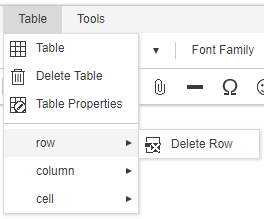
	    "table": [
	      "table",
	      "deleteTable",
	      "tableProperties",
	      "-",
	      {
	        "groupName": "row",
	        "subMenuItems": [
	          "insertRowBefore",
	          "insertRowAfter",
	          "deleteRow"
	        ]
	      },
	      {
	        "groupName": "column",
	        "subMenuItems": [
	          "insertColBefore",
	          "insertColAfter",
	          "deleteCol"
	        ]
	      },
	      {
	        "groupName": "cell",
	        "subMenuItems": [
	          "mergeCell",
	          "splitCell",
	          "cellProperties"
	        ]
	      }
	    ],
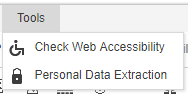
	    "tools": [
	      "accessibility",
	      "personalDataProtection"
	    ]
	  }
} |
| 메뉴 설정 | 결과 | 메뉴 설정 | 결과 |
|---|---|---|---|
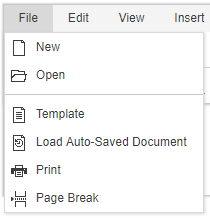
"file": [
    "new",
    "open",
    "-",
    "template",
    "autoSave",
    "print",
    "pageBreak"
]
|
| "edit": [
"undo",
"redo",
"-",
"copy",
"-",
"find"
]
|  |
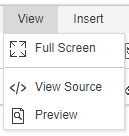
"view": [
    "fullScreen",
    "-",
    "source",
    "preview"
]
|
| "insert": [
"link",
"image",
"background",
"-",
"video",
"file",
"horizontalLine",
"-",
"specialCharacter",
"emoji"
] |
|
"format": [ "bold",
"italic",
"underline",
"strike",
"-",
"superScript",
"subScript",
"-",
{
"groupName": "list",
"subMenuItems": [
"bulletList",
"numberedList",
"multiLevelList"
]
},
"increaseIndent",
"decreaseIndent",
"-",
{
"groupName": "align",
"subMenuItems": [
"alignLeft",
"alignCenter",
"alignRight",
"alignJustify"
]
},
{
"groupName": "style",
"subMenuItems": [
"copyRunStyle",
"pasteRunStyle",
"removeRunStyle"
]
},
"paragraphProperties"
] |
| "table": [
"table",
"deleteTable",
"tableProperties",
"-",
{
"groupName": "row",
"subMenuItems": [
"insertRowBefore",
"insertRowAfter",
"deleteRow"
]
},
{
"groupName": "column",
"subMenuItems": [
"insertColBefore",
"insertColAfter",
"deleteCol"
]
},
{
"groupName": "cell",
"subMenuItems": [
"mergeCell",
"splitCell",
"cellProperties"
]
}
]
|
|
"tools": [
    "accessibility",
    "personalDataProtection"
] |
|
Import API 및 Upload API 설정
...
- 기본 스타일을 지정하여 inline-style로 랜더링 됩니다.
| Version | |||||
|---|---|---|---|---|---|
| 모델별 Default Style 지정가능 | ||||
| Body Default Style 만 지정 가능 |
| Status | ||
|---|---|---|
|
'editor.defaultStyle': 지정하고싶은 모델 Element Type에 기본 속성을 지정할 수 있습니다.
...