...
| Code Block | ||||||
|---|---|---|---|---|---|---|
| ||||||
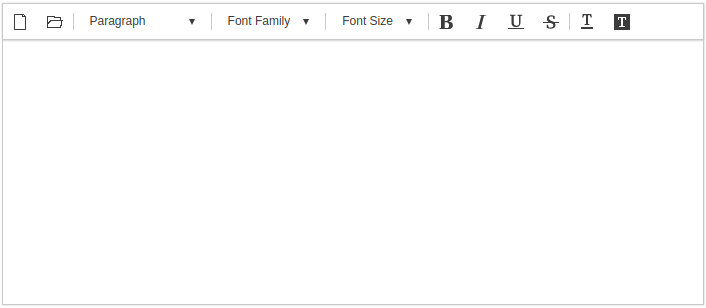
var synapEditorConfig = { "'editor.license"': "'/resource/license.json"', "'editor.size.width"': "'100%"', "'editor.size.height"': "'100%"', "'editor.lang.default"': "'en"', "'editor.menu.show"': false, "'editor.toolbar"': ["'new"',"'open"',"'|"', "'paragraphStyleWithText"', "'|"', "'fontFamilyWithText"', "'|"',"'fontSizeWithText"', "'|"',"'bold"', "'italic"', "'underline"', "'strike"', "'|"',"'fontColor"', "'fontBackgroundColor"'] } |
초기화 예시
위와 같은 파라메터들을 설정한 경우 사이냅에디터는 아래와 보입니다.
툴바 설정
"'editor.toolbar"'키를 이용해서 아래와 같이 설정합니다.
| Code Block | ||||||
|---|---|---|---|---|---|---|
| ||||||
{
	"'editor.toolbar"': ["'new"',"'open"',"'|"', "'paragraphStyleWithText"', "'|"', "'fontFamilyWithText"', "'|"',"'fontSizeWithText"', "'|"',"'bold"', "'italic"', "'underline"', "'strike"', "'|"',"'fontColor"', "'fontBackgroundColor"']
} |
| TOOLBAR KEY | ICON | 설명 |
|---|---|---|
| new |
| 편집중인 내용을 모두 지우고 새문서를 만든다. |
| open |
| 문서를 임포트한다. |
| 인쇄를 한다 | |
| pageBreak |
| 인쇄시 사용되는 페이지 구분자를 추가한다 |
| template |
| 템플릿 다이얼로그를 연다 |
| autoSave |
| 자동저장된 문서목록을 불러온다 |
| undo |
| 실행취소 |
| redo |
| 재실행 |
paragraphStyle |
| 문단스타일을 지정한다 (P, H1 ~ H6) |
paragraphStyleWithText |
| 문단스타일 지정버튼을 드롭다운 형태로 보여준다 |
fontFamily |
| 글꼴을 설정한다 |
fontFamilyWithText |
| 글꼴설정 버튼을 드롭다운 형태로 보여준다 |
fontSize |
| 글자크기를 설정한다 |
fontSizeWithText |
| 글자크기 설정버튼을 드롭다운 형태로 보여준다 |
| customParagraphStyle |
| 사용자정의 문단스타일을 보여준다. 사용자정의 문단스타일은 config에 설정해야한다. |
| customRunStyle |
| 사용자정의 글자스타일을 보여준다. 사용자정의 글자스타일은 config에 설정해야한다. |
| growFont |
| 글자크기를 한단계 키운다. |
| shrinkFont |
| 글자크기를 한단계 줄인다. |
| bold |
| 굵게 |
| italic |
| 기울임 |
| underline |
| 밑줄 |
| strike |
| 취소선 |
| superScript |
| 위첨자 |
| subScript |
| 아래첨자 |
| fontColor |
| 글자색 |
| fontBackgroundColor |
| 글자배경색 |
| align |
| 문단정렬 (left, center, right, justify) |
| copy |
| 복사 |
| cut |
| 잘라내기 |
| paste |
| 붙여넣기 |
| copyRunStyle |
| 서식복사 |
| pasteRunStyle |
| 서식붙여넣기 |
| removeRunStyle |
| 서식지우기 |
| link |
| 링크 |
| unlink |
| 링크해제 |
| table |
| 표 삽입 |
| image |
| 이미지 삽입 |
| background |
| 문서 배경 이미지 및 색 지정 |
| video |
| 동영상 삽입 |
| file |
| 파일 삽입 |
| horizontalLine |
| 가로줄 삽입 |
| specialCharacter |
| 특수문자 삽입 |
| emoji |
| 이모지 삽입 |
| div |
| 레이어 삽입 |
| drawDiv |
| 레이어 그리기 |
| quote |
| 인용문구 삽입 |
| bulletList |
| 글머리 기호 |
| numberedList |
| 글머리 번호 |
| multiLevelList |
| 다단계 글머리 |
| increaseIndent |
| 들여쓰기 |
| decreaseIndent |
| 내어쓰기 |
| lineHeight |
| 줄간격 |
| lineHeightWithText |
| 줄간격 버튼을 드롭다운 형태로 보여준다. |
| paragraphProperties |
| 문단 상세속성 편집 |
| fullScreen |
| 전체화면 |
| source |
| 소스보기 |
| preview |
| 미리보기 |
| ruler |
| 줄자 |
| divOutline |
| 레이어 외각선 보이기/감추기 |
| accessibility |
| 웹접근성 검사 |
| personalDataProtection |
| 개인정보보호 (검출) |
| find |
| 찾기/바꾸기 |












...
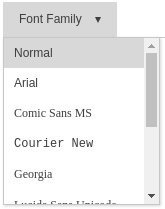
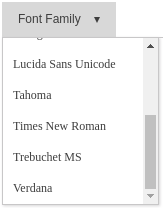
글꼴 목록
| Status | ||
|---|---|---|
|
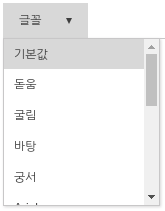
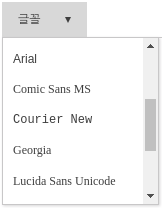
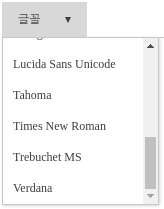
"'editor.fontFamily"'로 편집시 사용할 폰트 목록을 설정합니다.
| Code Block | ||||||
|---|---|---|---|---|---|---|
| ||||||
{
	"'editor.fontFamily"': {
		ko:	 [
        	'돋움', '굴림', '바탕', '궁서',
	        'Arial', 'Comic Sans MS', 'Courier New', 'Georgia',
	        'Lucida Sans Unicode', 'Tahoma', 'Times New Roman', 'Trebuchet MS', 'Verdana'
	    ],
	    en: [
	        'Arial', 'Comic Sans MS', 'Courier New', 'Georgia',
	        'Lucida Sans Unicode', 'Tahoma', 'Times New Roman', 'Trebuchet MS', 'Verdana'
	    ]
	},
} |
...
| 한국어일 때 (ko) | 영어일 때 (en) |
|---|---|
|
|
메뉴 설정
"'editor.menu.show"'키로 메뉴 사용여부를 결정한다.
| Code Block | ||||||
|---|---|---|---|---|---|---|
| ||||||
{
	"'editor.menu.show"': true
} |
"'editor.menu.list"'를 이용해서 1 depth 메뉴를 구성한다.
| Code Block | ||||||
|---|---|---|---|---|---|---|
| ||||||
{
	"'editor.menu.list"': [
    	"'file"',
	    "'edit"',
	    "'view"',
	    "'insert"',
	    "'format"',
	    "'table"',
	    "'tools"'
	  ]
} |
"'editor.menu.definition"'를 이용해서 서브메뉴를 구성한다.
| Code Block | ||||||
|---|---|---|---|---|---|---|
| ||||||
{
	"'editor.menu.definition"': {
    	"'file"': [
	      "'new"',
	      "'open"',
	      "'-"',
	      "'template"',
	      "'autoSave"',
	      "'print"',
	      "'pageBreak"'
	    ],
	    "'edit"': [
	      "'undo"',
	      "'redo"',
	      "'-"',
	      "'copy"',
	      "'-"',
	      "'find"'
	    ],
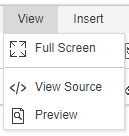
	    "'view"': [
	      "'fullScreen"',
	      "'-"',
	      "'source"',
	      "'preview"'
	    ],
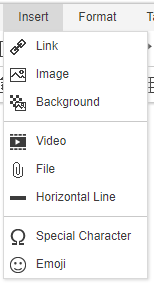
	    "'insert"': [
	      "'link"',
	      "'image"',
	      "'background"',
	      "'-"',
	      "'video"',
	      "'file"',
	      "'horizontalLine"',
	      "'-"',
	      "'specialCharacter"',
	      "'emoji"'
	    ],
	    "'format"': [
	      "'bold"',
	      "'italic"',
	      "'underline"',
	      "'strike"',
	      "'-"',
	      "'superScript"',
	      "'subScript"',
	      "'-"',
	      {
	        "'groupName"': "'list"',
	        "'subMenuItems"': [
	          "'bulletList"',
	          "'numberedList"',
	          "'multiLevelList"'
	        ]
	      },
	      "'increaseIndent"',
	      "'decreaseIndent"',
	      "'-"',
	      {
	        "'groupName"': "'align"',
	        "'subMenuItems"': [
	          "'alignLeft"',
	          "'alignCenter"',
	          "'alignRight"',
	          "'alignJustify"'
	        ]
	      },
	      {
	        "'groupName"': "'format"',
	        "'subMenuItems"': [
	          "'copyRunStyle"',
	          "'pasteRunStyle"',
	          "'removeRunStyle"'
	        ]
	      },
	      "'paragraphProperties"'
	    ],
	    "'table"': [
	      "'table"',
	      "'deleteTable"',
	      "'tableProperties"',
	      "'-"',
	      {
	        "'groupName"': "'row"',
	        "'subMenuItems"': [
	          "'insertRowBefore"',
	          "'insertRowAfter"',
	          "'deleteRow"'
	        ]
	      },
	      {
	        "'groupName"': "'column"',
	        "'subMenuItems"': [
	          "'insertColBefore"',
	          "'insertColAfter"',
	          "'deleteCol"'
	        ]
	      },
	      {
	        "'groupName"': "'cell"',
	        "'subMenuItems"': [
	          "'mergeCell"',
	          "'splitCell"',
	          "'cellProperties"'
	        ]
	      }
	    ],
	    "'tools"': [
	      "'accessibility"',
	      "'personalDataProtection"'
	    ]
	  }
} |
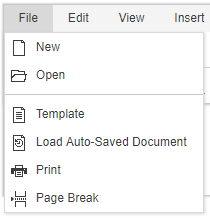
| 메뉴 설정 | 결과 | 메뉴 설정 | 결과 |
|---|---|---|---|
"'file"': [ "'new"', "'open"', "'-"', "'template"', "'autoSave"', "'print"', "'pageBreak"' ] |
| "'edit"': [ "'undo"', "'redo"', "'-"', "'copy"', "'-"', "'find"' ] | 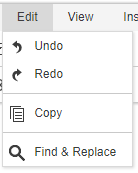 |
"'view"': [ "'fullScreen"', "'-"', "'source"', "'preview"' ] |
| "'insert"': [ "'link"', "'image"', "'background"', "'-"', "'video"', "'file"', "'horizontalLine"', "'-"', "'specialCharacter"', "'emoji"' ] |
|
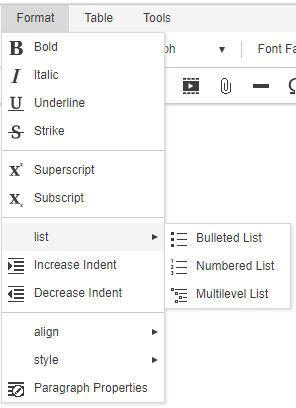
"'format"': [ "'bold"', "'italic"', "'underline"', "'strike"', "'-"', "'superScript"', "'subScript"', "'-"', { "'groupName"': "'list"', "'subMenuItems"': [ "'bulletList"', "'numberedList"', "'multiLevelList"' ] }, "'increaseIndent"', "'decreaseIndent"', "'-"', { "'groupName"': "'align"', "'subMenuItems"': [ "'alignLeft"', "'alignCenter"', "'alignRight"', "'alignJustify"' ] }, { "'groupName"': "'style"', "'subMenuItems"': [ "'copyRunStyle"', "'pasteRunStyle"', "'removeRunStyle"' ] }, "'paragraphProperties"' ] |
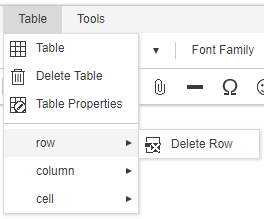
| "'table"': [ "'table"', "'deleteTable"', "'tableProperties"', "'-"', { "'groupName"': "'row"', "'subMenuItems"': [ "'insertRowBefore"', "'insertRowAfter"', "'deleteRow"' ] }, { "'groupName"': "'column"', "'subMenuItems"': [ "'insertColBefore"', "'insertColAfter"', "'deleteCol"' ] }, { "'groupName"': "'cell"', "'subMenuItems"': [ "'mergeCell"', "'splitCell"', "'cellProperties"' ] } ] |
|
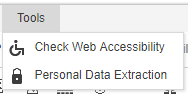
"'tools"': [ "'accessibility"', "'personalDataProtection"' ] |
|
Import API 및 Upload API 설정
"'editor.import.api"', "'editor.upload.image.api"', "'editor.upload.video.api"', "'editor.upload.file.api" ' 키를 사용하여 업로드 및 임포트 API를 설정한다.
...
| Code Block | ||||||
|---|---|---|---|---|---|---|
| ||||||
{
	"'editor.import.maxSize"': 10485760,
	"'editor.import.api"': "'/importDoc"',
	"'editor.import.param"': {},
	"'editor.upload.maxSize"': 3145728,
	"'editor.upload.image.api"': "'/uploadImage"',
	"'editor.upload.image.param"': {},
	"'editor.upload.video.api"': "'/uploadVideo"',
	"'editor.upload.video.param"': {},
	"'editor.upload.file.api"': "'/uploadFile"',
	"'editor.upload.file.param"': {},
} |
업로드 가능 확장자 설정
| Status | ||
|---|---|---|
|
"'editor.upload.image.extensions"', "'editor.upload.video.extensions"', "'editor.upload.file.extensions" ' 키를 사용해 업로드 가능 확장자를 설정할 수 있다.
| Code Block | ||||||
|---|---|---|---|---|---|---|
| ||||||
{
	"'editor.upload.image.extensions"': ["'jpg"', "'gif"', "'png"', "'jpeg"'],
	"'editor.upload.video.extensions"': ["'mp4"', "'ogg"', "'webm"'],
	"'editor.upload.file.extensions"': ["'bmp"', "'css"', "'csv"', "'diff"', "'doc"',
									"'docx"', "'eof"', "'gif"', "'jpeg"', "'jpg"',
									"'json"', "'mp3"', "'mp4"', "'m4a"', "'odp"',
									"'ods"', "'odt"', "'ogg"', "'otf"', "'patch"',
									"'pdf"', "'png"', "'ppt"', "'pptx"', "'rtf"',
									"'svg"', "'swf"', "'textile"', "'tif"', "'tiff"',
									"'ttf"', "'txt"', "'wav"', "'webm"', "'woff"',
									"'xls"', "'xlsx"', "'xml"', "'md"', "'vtt"',
									"'hwp"', "'hml"', "'html"']
} |
언어 설정
"'editor.lang.default" ' 키를 이용해서 기본언어를 설정한다. 기본언어는 사용자환경에 맞는 언어가 없을 경우 표시되는 언어를 말한다.
| Code Block | ||||||
|---|---|---|---|---|---|---|
| ||||||
{
	"'editor.lang.default"': "'en"'
} |
사용자 환경에 관계없이 특정 언어를 서비스를 하려면 "'editor.lang" ' 키를 이용한다.
| Code Block | ||||||
|---|---|---|---|---|---|---|
| ||||||
{
	"'editor.lang"' : "'en"'
} |
고급 설정
템플릿
브라우저에서 접근가능한 특정 위치에 template 파일을 등록하고 아래와 같이 설정하면 template기능을 사용 할 수 있다.
| Code Block | ||||||
|---|---|---|---|---|---|---|
| ||||||
{
	"'editor.template"': [
	{
		"'category"': "'template_category1"',
		"'label"': "'Report"',
		"'items"': [
		{
			"'name"': "'Research Report"',
			"'path"': "'/resource/template/template1.html"'
		},
		{
			"'name"': "'Sales Report"',
			"'path"': "'/resource/template/template2.html"'
		}]
	}]

} |
Custom style
사용자정의 문단스타일을 사용하려면 아래와 같이 환경설정을 해야 한다.
| Code Block | ||||||
|---|---|---|---|---|---|---|
| ||||||
{
	"'editor.customStyle.paragraph"': [
    {
      "'name"': "'Gray"',
      "'style"': {
        "'color"': {
          "'r"': 170,
          "'g"': 170,
          "'b"': 170
        }
      }
    }
  ],
} |
사용자정의 문단스타일 적용결과
...
| Code Block | ||||||
|---|---|---|---|---|---|---|
| ||||||
{
	"'editor.customStyle.textRun"': [
    {
      "'name"': "'BigRed"',
      "'style"': {
        "'fontSize"': 32,
        "'color"': {
          "'r"': 255,
          "'g"': 0,
          "'b"': 0
        }
      }
    },
    {
      "'name"': "'SmallBlue"',
      "'style"': {
        "'fontSize"': 16,
        "'color"': {
          "'r"': 0,
          "'g"': 0,
          "'b"': 255
        }
      }
    }
  ]
} |
사용자 정의 런스타일 설정 결과
...
| Code Block | ||||
|---|---|---|---|---|
| ||||
'editor.defaultStyle': {
    fontFamily: "'Arial, Helvetica, sans-serif"',
    fontSize: 11,
    lineHeight: {
        value: 1.2,
        unit: ''
    }
}, |
...
| Code Block | ||||||
|---|---|---|---|---|---|---|
| ||||||
{
	"'editor.autoSave"': true,
	"'editor.autoSave.period"': 60000,
} |
ContentFilter
"'editor.contentFilter.allowIFrame" ' 값을 false로 설정하면 사용자 iframe tag 삽입을 제한하여 자동 태그 제거.
"'editor.contentFilter.allowIScript" ' 값을 false로 설정하면 사용자 script tag 삽입을 제한하여 자동 태그 제거.
| Code Block | ||||||
|---|---|---|---|---|---|---|
| ||||||
 {
	"'editor.contentFilter.allowIFrame"': false,
	"'editor.contentFilter.allowScript"': false
} |
Unload 메세지
| Status | ||
|---|---|---|
|
"'editor.unloadMessage" ' 값을 true로 설정하면 웹페이지가 unload 되었을 때 '페이지를 나가시겠습니까' 확인메세지가 보여집니다. (기본값 = false)
| Code Block | ||||||
|---|---|---|---|---|---|---|
| ||||||
{
	"'editor.unloadMessage"': false
} |
가로 스크롤
| Status | ||
|---|---|---|
|
"'editor.horizontalScroll" ' 값을 true로 설정하면 에디터에서 가로스크롤을 사용합니다. (기본값 = true)
| Code Block | ||||||
|---|---|---|---|---|---|---|
| ||||||
{
	"'editor.horizontalScroll"': true
} |
레이어 가이드
| Status | ||
|---|---|---|
|
...