...
| Code Block | ||||
|---|---|---|---|---|
| ||||
var pluginName = "pluginName";

SynapEditor.addPlugin(pluginName, {
	init: function (editor) {
		// 플러그인 버튼 정의
		editor.definePluginButton(pluginName, {
			icon: '<svg><g>........</g></svg>',
			label: '버튼이름', // 버튼에 마우스를 올리면 툴팁으로 보여집니다.
			onClickFunc: function (editor) {
				// 버튼을 클릭하면 실행
			}
		});
	}
}); |
...
...
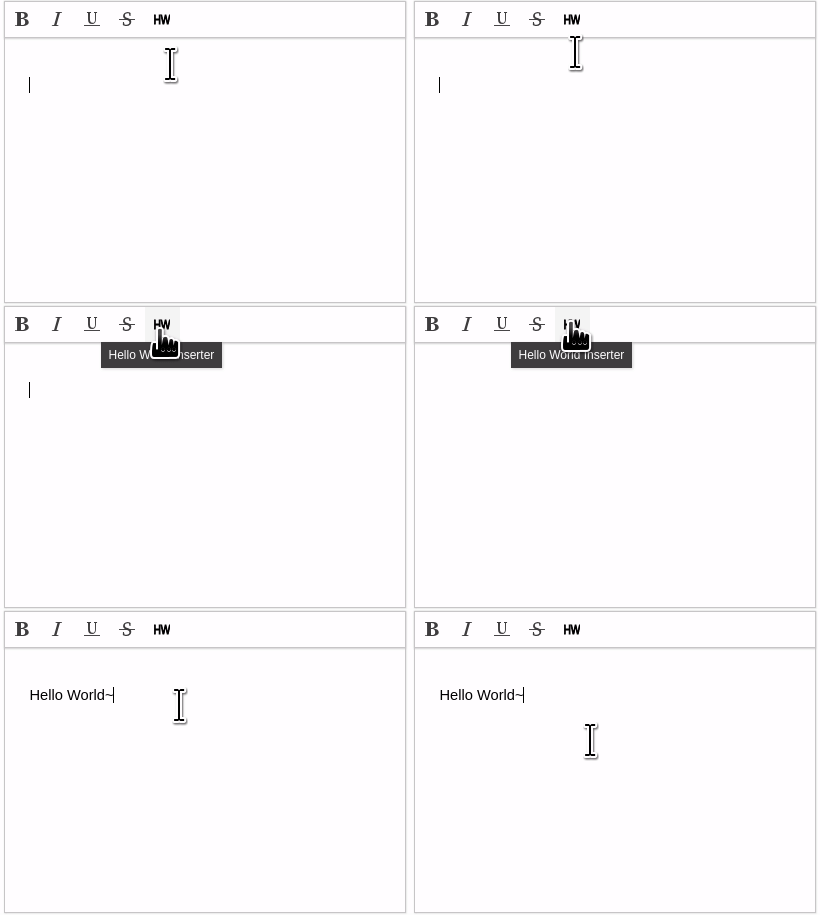
활용 예: 'Hello World~'를 에디터에 삽입하는 플러그인
myPlugin.js
플러그인 객체 작성
- init 함수를 포함한 객체를 작성합니다.
- init 함수에는 에디터의 instance가 전달됩니다.
| Code Block | ||||||
|---|---|---|---|---|---|---|
| ||||||
var pluginObject = {
	init: function (editor) {
		// 플러그인 코드
	}
}; |
init 함수: 플러그인 버튼 정의
- init 함수로 전달된 에디터를 이용해 플러그인 버튼에 대한 정의를 등록합니다.
- 아이콘, 버튼 레이블, 클릭했을 때의 동작
| Code Block | ||||||
|---|---|---|---|---|---|---|
| ||||||
var pluginName = "HelloWorldInserter";
var pluginObject = {
	init: function (editor) {
		var buttonDefinition = {
			icon: '<svg xmlns="http://www.w3.org/2000/svg" version="1.1" viewBox="0 0 16 16">
						<g xmlns="http://www.w3.org/2000/svg"><title>Layer 1</title>
							<text stroke="#000000" transform="matrix(0.7835232019424438,0,0,1,0.2672135476022959,0) " xml:space="preserve"
									text-anchor="start" font-family="Helvetica, Arial, sans-serif" font-size="13" y="12.580528" x="-1.056391" fill="#000000">HW</text>
						</g>
				 </svg>',
			label: 'Hello World Inserter',
			onClickFunction: function (editor) {
				// 버튼을 클릭했을 때 동작
				editor.execCommand('insertText', 'Hello World~');
			}
		};
		editor.definePluginButton(pluginName, buttonDefinition);
	}
}; |
플러그인 등록
| Code Block | ||||||
|---|---|---|---|---|---|---|
| ||||||
var pluginName = "HelloWorldInserter"; SynapEditor.addPlugin(pluginName, pluginObject); |
index.html
작성한 플러그인 로드
| Code Block | ||||||
|---|---|---|---|---|---|---|
| ||||||
<!-- my plugin --> <script type="text/javascript" src="../plugins/myPlugin.js"></script> |
config.js
에디터 config에 플러그인 사용 설정
| Code Block | ||||||
|---|---|---|---|---|---|---|
| ||||||
"editor.plugins": ["HelloWorldInserter"] |
결과