Page tree

Versions Compared

Key

  • This line was added.
  • This line was removed.
  • Formatting was changed.

...

Key

Type

Description

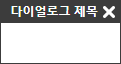
titlestring

다이얼로그의 제목을 설정합니다.

Code Block
themeEmacs
editor.createCustomDialog('myCustomDialog', {
    title: '다이얼로그 제목'
});

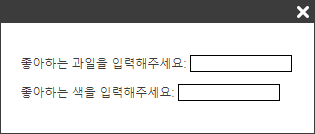
bodyHTMLstring

다이얼로그의 내용 HTML을 설정합니다.

Code Block
themeEmacs
editor.createCustomDialog('myCustomDialog', {
    bodyHTML: '<p>좋아하는 과일을 입력해주세요: <input id="favorite-fruits" style="border: 1px solid black; width: 100px;" /></p>' +
            '<p>좋아하는 색을 입력해주세요: <input id="favorite-colors" style="border: 1px solid black; width: 100px;" /></p>';
});

bodyClassNamesstring[]

다이얼로그에 클래스를 설정합니다. 설정한 클래스 이름은 다이얼로그의 Body 부분(.se-dialog-body)에 추가됩니다.

Code Block
themeEmacs
editor.createCustomDialog('myCustomDialog', {
    bodyClassNames: ['custom-class-1', 'custom-class-2', 'custom-class-3']
});

Image RemovedImage Added
 

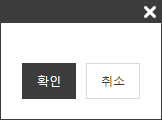
footerButtonsObject[]

다이얼로그의 버튼을 설정합니다. 각각의 버튼에 설정할 수 있는 값은 아래와 같습니다.

  • type: string - 버튼의 타입. 설정한 타입이 버튼의 클래스 이름으로 설정됩니다. ex) confirm => se-confirm, cancel => se-cancel
  • point: boolean - 포인트 색을 줄지 여부 (true: 검정 버튼, false: 흰 버튼)
  • label: string - 버튼에 나타날 텍스트


Code Block
themeEmacs
editor.createCustomDialog('myCustomDialog', {
	footerButtons: [
		{ type: 'confirm', point: true, label: '확인' },
		{ type: 'cancel', point: false, label: '취소' }
	]
});

...