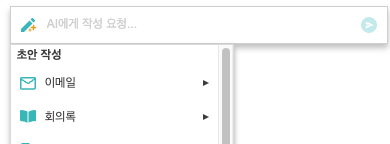
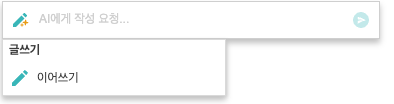
...
글 작성 AI와 관련된 설정은 'text' , 이미지 생성 AI와 관련된 설정은 'image' 키 아래에 객체로 정의합니다.
이미지 생성 AI와 관련된 내용은 오른쪽 링크에서 확인해주세요: [AIWriteSupporter] 이미지 생성 AI
| Code Block |
|---|
| language | js |
|---|
| theme | Emacs |
|---|
| title | synapeditor.config.js |
|---|
|
'aiWriteSupporter.config': {
	text: {
		url: '/request',
		//...
	},
	image: {
		url: '/request',
		//...
	}
} |
사용 가능한
...
키 (text 객체에 설정)
| Key | Type | 필수 | 기본값 | 설명 |
|---|
| url | string | O | '' | - 요청을 보낼 URL을 설정합니다.
- OpenAI의 API 주소
- OpenAI의 API로 요청을 하도록 구현한 URL
- HyperCLOVA X로 요청을 하도록 구현한 URL
- 설정이 되지 않으면 툴바에 플러그인 버튼이 표시되지 않습니다.
|
| apiKey | string |
| '' | - OpenAI에서 발급받은 API Key를 설정합니다.
- 해당 설정을 사용하게 되면 브라우저에 Key 값이 노출되기 때문에, Key 값을 설정하지 않고 서버를 통해 요청을 할 수 있도록 하는 것이 안전합니다.
|
| string | | 'gpt' | - 사용할 AI를 설정합니다. 기본값은 'gpt'입니다.
- OpenAI GPT: 'gpt'
- NAVER HyperCLOVA X: 'hcx'
|
| requestBody | Object |
| {} | - 추가로 API에 전송할 내용을 설정합니다.
- max_tokens
- temperature
- n
- ....
- 자세한 내용은 아래 링크를 참고해 주세요.
|
| ocrUrl | string |
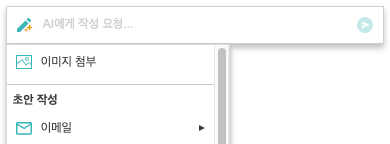
| '' | - OCR URL을 설정하면 초안 작성 메뉴에서 '이미지 첨부'메뉴가 활성화됩니다.
- 이미지를 첨부하면 이미지에 있는 텍스트를 추출해 추출된 텍스트와 프롬프트를 AI에 함께 전송합니다.
|
customPrompts | Object[] |
| [] | - 사용자 정의 프롬프트 메뉴를 추가합니다.
- key, type, label, prompt 키를 가지는 객체의 배열을 설정합니다.
| Code Block |
|---|
| {
key: 'customPromptKey',
type: 'prompt', // 또는 'immediately'
label: {
ko: '메뉴에 보여지는 텍스트',
en: 'Label shown in menu'
},
prompt: {
ko: 'AI에게 전달될 프롬프트. 요약해줘, 내용을 늘려줘, ...',
en: 'Prompts to be passed to the AI',
}
} |
| Code Block |
|---|
| {
key: 'customPromptKey',
type: 'group',
label: {
ko: '하위 메뉴가 있는 메뉴',
en: 'Menu with submenus'
},
items: ['summarize', 'explanation', ...]
} |
| key | Type | 필수 | 설명 |
|---|
| key | string | O | - 프롬프트를 구분할 수 있는 유니크한 값을 설정합니다.
| | type | 'prompt' | 'immediately' | 'group' | O | - prompt: 프롬프트 입력칸에 prompt에 정의한 텍스트가 추가됩니다.
- immediately: prompt에 정의한 텍스트가 메뉴를 실행 시 바로 전송됩니다.
- group: 하위 메뉴를 가지는 경우 설정합니다.
| | label | Object | O | | | prompt | Object |
| | | items | string[] |
| type: 'group'일 때만 유효합니다.
- 하위 메뉴에 보일 프롬프트 메뉴의 key를 배열 형태로 설정합니다.
| | iconName | string |
| - 아이콘 이름을 설정합니다.
- 이름에 해당하는 아이콘이 에디터에 등록이 되어있으면 메뉴에 아이콘이 보입니다.
|
|
| categoryConfig | Object |
| {} | - 카테고리 별 보일 프롬프트 메뉴를 설정합니다.
- 카테고리는 아래와 같습니다.
- favorite: 즐겨찾기
- draft: 초안 작성
- edit: 편집 또는 검토
- createByReference: 내용을 참고하여 생성
- write: 글쓰기
|
...
| Code Block |
|---|
| language | js |
|---|
| theme | Emacs |
|---|
| title | synapeditor.config.js |
|---|
|
// URL과 API Key를 설정하는 경우
'aiWriteSupporter.config': {
    text: {
        url: 'https://api.openai.com/v1/chat/completions',
        apiKey: 'sk-abc123...456xyz' // 브라우저에 노출되므로 안전하지 않음
    }
}

// URL만 설정하는 경우
'aiWriteSupporter.config': {
    text: {
        url: '/request'
    }
} |
| Status |
|---|
| colour | Yellow |
|---|
| title | 릴리즈 2.18.0 이상 |
|---|
|
사용할 생성형 AI에 맞춰 아래와 같이 설정합니다.
OpenAI OpenAI GPT 설정
| Code Block |
|---|
| language | js |
|---|
| theme | Emacs |
|---|
| title | synapeditor.config.js |
|---|
|
// URL과 API Key를 설정하는 경우
'aiWriteSupporter.config': {
    text: {
        ai: 'gpt',
        url: 'https://api.openai.com/v1/chat/completions',
        apiKey: 'sk-abc123...456xyz' // 브라우저에 노출되므로 안전하지 않음
    }
}

// URL만 설정하는 경우
'aiWriteSupporter.config': {

    text: {
        ai: 'gpt',
        url: '/request'
    }
}
|
Naver HyperCLOVA X 설정
| Code Block |
|---|
| language | js |
|---|
| theme | Emacs |
|---|
| title | synapeditor.config.js |
|---|
|
// url: HyperCLOVA X로 요청을 하도록 구현한 URL
'aiWriteSupporter.config': {
    text: {
        ai: 'hcx',
        url: '/request',
    }
} |
Request Body 설정
API 요청 시 추가로 필요한 값들을 설정합니다.
...
| Code Block |
|---|
| language | js |
|---|
| theme | Emacs |
|---|
| title | synapeditor.config.js |
|---|
|
// Request body 설정
'aiWriteSupporter.config': {
    text: {
        url: 'url',
        apiKey: 'apiKey',
        requestBody: {
            temperature: 2,
            presence_penalty: 2,
            ...
        }
    }
} |
| Status |
|---|
| colour | Yellow |
|---|
| title | 릴리즈 2.18.0 이상 |
|---|
|
...
| Code Block |
|---|
| language | js |
|---|
| theme | Emacs |
|---|
| title | synapeditor.config.js |
|---|
|
'aiWriteSupporter.config': {
    text: {
        ocrUrl: 'https://ailab.synap.co.kr/sdk', // 프로모션 기간 중 사용이 가능합니다.
        ocrApiKey: '발급받은 API key''
    }
} |
| 'ocrUrl'을 설정하지 않음: 초안 작성시 '이미지 첨부'메뉴 보이지 않음 | 'ocrUrl'을 설정: 초안 작성시 '이미지 첨부'메뉴 보여짐 |
|---|
| |
...
| Code Block |
|---|
| language | js |
|---|
| theme | Emacs |
|---|
| title | synapeditor.config.js |
|---|
|
'aiWriteSupporter.config': {
    text: {
    customPrompts: [
            {
            	key: 'my-custom-menu1',
            	type: 'prompt',
      	    	label: {
      	        	ko: '나의 커스텀 메뉴 1',
                	en: 'My most used menu'
            	},
            	prompt: {
                	ko: '바나나를 영어로',
                	en: 'banana in english',
            	}
        	},
            {
   {             key: 'my-custom-menu2',
            	type: 'immediately',
        	    label: {
                	ko: '나의 커스텀 메뉴 2',
                	en: 'My most used menu'
            	},
            	prompt: {
                	ko: '포도를 영어로',
                	en: 'grape in english',
            	}
        	},
	    	{
            	key: 'my-custom-menu3',
            	type: 'group',
            	label: {
            	    ko: '내가 제일 자주쓰는 메뉴 모음',,
                	en: 'My most used menu'
            	},
            	items: ['englishTranslation', 'tabularFormat']
        	}
        ]
    }
} |
카테고리 별 보일 프롬프트 메뉴 설정
카테고리 별 보일 프롬프트 메뉴를 설정합니다.
...
| 적용된 모습 | 설정 |
|---|
|
| Code Block |
|---|
| language | js |
|---|
| theme | Emacs |
|---|
| title | synapeditor.config.js |
|---|
| 'aiWriteSupporter.config': {
text: {
categoryConfig: {
draft: [
'meetingRequestEmail', 'salesEmail', 'jobAnnouncement'
]
}
}
} |
|
편집 또는 검토(edit), 내용을 참고하여 생성(createByReference) 카테고리가 보이지 않도록 하기
...
| 적용된 모습 | 설정 |
|---|
|
| Code Block |
|---|
| language | js |
|---|
| theme | Emacs |
|---|
| title | synapeditor.config.js |
|---|
| 'aiWriteSupporter.config''aiWriteSupporter.config': {
text: {
categoryConfig: {
edit: [],
createByReference: []
}
}
} |
|
즐겨찾기(favorite) 카테고리에 커스텀 메뉴 추가하기
...
| 적용된 모습 | 설정 |
|---|
|
| Code Block |
|---|
| language | js |
|---|
| theme | Emacs |
|---|
| title | synapeditor.config.js |
|---|
| // 즐겨찾기 카테고리에 커스텀 메뉴 추가
'aiWriteSupporter.config': {
text: {
categoryConfig: {
favorites: ['my-custom-menu1', 'my-custom-menu2', 'my-custom-menu3']
},
customPrompts: [
{
key: 'my-custom-menu1',,
type: 'prompt',
label: {
ko: '나의 커스텀 메뉴 1',
en: 'My custom menu'
},
prompt: {
ko: '바나나를 영어로',
en: 'banana in english',
}
},
{
key: 'my-custom-menu2',
type: 'immediately',
label: {
ko: '나의 커스텀 메뉴 2',
en: 'My custom menu''
},
prompt: {
ko: '포도를 영어로',
en: 'grape in english',
}
},
{
key: 'my-custom-menu3',
type: 'group',
label: {
ko: '내가 제일 자주쓰는 메뉴 모음',
en: 'My most used menu'
},
items: ['englishTranslation', 'tabularFormat']
}
]
}
} |
|