...
| Table of Contents | ||||
|---|---|---|---|---|
|
...
1. 설치
사이냅에디터 사이냅 에디터 설치파일은 아래와 같이 구성되어 있습니다.
- 사이냅에디터 사이냅 에디터 + 임포트 모듈
- SynapEditor_2.x.x.zip
- 메타파일 변환용 폰트
- fonts.zip
...
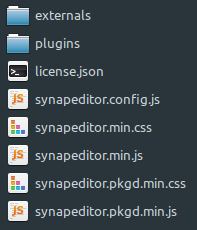
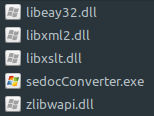
SynapEditor_2.x.x.zip 파일을 압축해제하면 아래와 같은 경로가 생성됩니다.
| 경로 | 내용 | 설명 |
|---|---|---|
/workspace/SynapEditor_2.x.x/SynapEditor사이냅에디터 : synapeditor |
| externals : 외부모듈 디렉토리 plugins : 플러그인 디렉토리 license.json : 라이센스 파일 synapeditor.config.js : 환경설정 파일 synapeditor.min.css, synapedtiro.min.js , : 사이냅 에디터 synapeditor.pkgd.min.css환경설정 : , synapeditor.pkgd.configmin.js 라이센스 : license.json 외부모듈 : externals 플러그인: plugins : 외부모듈과 플러그인이 모두 포함된 사이냅 에디터 |
| /workspace/SynapEditor_2.x.x/sedocConverter | Windows
Linux
| 임포트 모듈 (실행파일) Windows : sedocConverter.exe, 각종 dll Linux : sedocConverter_exe |

| Status | ||
|---|---|---|
|
- 외부모듈: formula-parser.min.js 추가 되었습니다.
- 플러그인: tuiImageEditor 추가 되었습니다.
fonts.zip 파일도 /workspace아래에 압축을 풀어주세요.
| 경로 | 설명 |
|---|---|
/workspace/fonts | 문서 임포트 시 메타파일(wmf/emf) 변환에 사용되는 font들폰트파일 |
2. 환경설정
2.1 라이선스 설정
synapeditor.config.js 파일을 열어서 license.json 파일의 경로를 수정합니다경로를 지정합니다. 이 때 license.json 파일은 파일의 경로는 브라우저에서 접근 가능한 경로로 표시해줘야 가능해야 합니다.
| Code Block | ||||||||
|---|---|---|---|---|---|---|---|---|
| ||||||||
{
   /**
     * 라이센스 파일의 경로 또는 라이센스 객체를 설정합니다.
     * ex) '/resource/license.json'
     * ex)  {
                'company': 'SynapSoft',
                'key': [
                    'licenseKey'
                ]
            }
     */
    'editor.license': 'synapeditor/license.json',
  ...
} |
...
환경설정 파일을 이용해서 에디터를 초기화합니다. 아래 설명을 참고하여 <div>나 <textarea> 태그중 하나를 선택해서 사용하시면 이용하여 초기화하면 됩니다.
3.1 <div> tag 사용
3.1.1 <script>와 <link> tag를 사용하여 js파일과 css파일을 include하세요.
...
| Code Block | ||||||
|---|---|---|---|---|---|---|
| ||||||
<!DOCTYPE html>
<html lang="ko">

<head>
<meta charset="utf-8">
<meta http-equiv="X-UA-Compatible" content="IE=edge">
<meta name="viewport" content="width=device-width, initial-scale=1.0, minimum-scale=1.0, maximum-scale=1.0, user-scalable=no, shrink-to-fit=no">
<title>Synap Editor | Unlimited Rich Text Editor</title>
<link href="resource/synapeditor/synapeditor.min.css" rel="stylesheet" type="text/css">
<script src="https://code.jquery.com/jquery-3.3.1.js"></script>
<script src="synapeditor/synapeditor.config.js"></script>
<script src="resource/synapeditor/synapeditor.min.js"></script>
<script>
$(document).ready(function() {
	var se = new SynapEditor("synapEditor", synapEditorConfig);
});
</script>
<body>
	<form id="seform" name="seform" action="/save" method="post">
		<textarea id="synapEditor"></textarea>
		<input type="submit" value="SAVE"/>
	</form>
</body>
</html> |
4. 플러그인 적용
| Include Page | ||||
|---|---|---|---|---|
|
4. 외부모듈
| Anchor | ||||
|---|---|---|---|---|
|
...