| Table of Contents |
|---|
이후의 예제는 아래와 같이 SynapEditor 객체를 설정하였다고 가정합니다.
In this section, a detailed explanation for integrating Synap Editor into your system will be given.
All examples assume that the editor instance was configured as follows:
| Code Block | ||||||
|---|---|---|---|---|---|---|
| ||||||
new SynapEditor('synapEditor', {
	'editor.upload.image.api': "/uploadImage",
	'editor.upload.video.api': "/uploadVideo",
	'editor.upload.file.api': "/uploadFile",
	'editor.import.api': "/importDoc"
}); |
...
이미지파일 업로드
[request]
이미지 업로드를 위해 지정한 고객 시스템의 URL로 에디터에서 해당 파일을 전송합니다. 이 URL은 앞서 설정된 editor.upload.image.api 값에 해당합니다
...
.
...
| Code Block | ||
|---|---|---|
| ||
Request URL: http://hostname/uploadImage
Request Method: POST |
| 키 | 설명 | 필수 | 타입 |
|---|---|---|---|
| file | 업로드할 이미지 파일 (multipart/form-data) |
...
| O | Binary |
[response]
이미지가 정상적으로 업로드되면, 고객 시스템에서는 아래와 같은 응답을 돌려주어야 합니다.
Once after the image has been successfully uploaded, your system should respond with the following data:
...
| Code Block | ||
|---|---|---|
| ||
{
    "uploadPath":"uploads/36a43f36f442b5824c6b061eb734553d.png"
} |
| 키 | 설명 | 타입 |
|---|---|---|
| uploadPath | 이미지가 업로드된 경로 (브라우저에서 접근할 수 있는 상대경로 또는 전체 URL) |
path to the uploaded image (as a URL that can be accessed from a web browser)
...
| String |
동영상 업로드
[request]
동영상 업로드를 위해 지정한 고객 시스템의 URL로 에디터에서 해당 파일을 전송합니다. 이 URL은 앞서 설정된 editor.upload.video.api 값에 해당합니다.
Send video file to your system via the URL that was configured as 'editor.upload.video.api' property.
| Code Block | ||
|---|---|---|
| ||
Request URL: http://hostname/uploadVideo
Request Method: POST |
| 키 | 설명 | 필수 | 타입 |
|---|---|---|---|
| file | 업로드할 동영상 파일 (multipart/form-data) |
...
| O | Binary |
[response]
동영상이 정상적으로 업로드되면, 고객 시스템에서는 아래와 같은 응답을 돌려주어야 합니다.
Once after the video has been successfully uploaded, your system should respond with the following data:
| Code Block | ||
|---|---|---|
| ||
{
    "uploadPath":"uploads/36a43f36f442b5824c6b061eb734553d.mp4"
} |
| 키 | 설명 | 타입 |
|---|---|---|
| uploadPath | 동영상이 업로드된 경로 (브라우저에서 접근할 수 있는 상대경로 또는 전체 URL) |
path to the uploaded video (as a URL that can be accessed from a web browser)
| String |
Uploading an arbitrary file
| Warning |
|---|
주의가 필요한 파일 형식 2. 마크업 / 스타일 언어 (xml, css, svg, textile, html 등) 3. 실행 파일 / 임베디드 파일 (swf, eof 등) |
[request]
임의의 파일 업로드를 위해 지정한 고객 시스템의 URL로 에디터에서 해당 파일을 전송합니다. 이 URL은 앞서 설정된 editor.upload.file.api 값에 해당합니다.
Send some arbitrary file to your system via the URL that was configured as 'editor.upload.file.api' property.
| Code Block | ||
|---|---|---|
| ||
Request URL: http://hostname/uploadFile
Request Method: POST |
| 키 | 설명 | 필수 | 타입 |
|---|---|---|---|
| file | 업로드할 파일 (multipart/form-data) file to be uploaded | O | Binary |
[response]
동영상이 정상적으로 업로드되면, 고객 시스템에서는 아래와 같은 응답을 돌려주어야 합니다.
Once after the file has been successfully uploaded, your system should respond with the following data:
| Code Block | ||
|---|---|---|
| ||
{
    "uploadPath":"uploads/36a43f36f442b5824c6b061eb734553d.docx"
} |
| 키 | 설명 | 타입 |
|---|---|---|
| uploadPath | 파일이 업로드된 경로 (브라우저에서 접근할 수 있는 상대경로 또는 전체 |
...
URL |
...
) | String |
문서 임포트
임포트를 위한 문서변환은 Synap Editor가 제공하는 sedocConverter 모듈에 의해 서버에서 이루어진다(sedocConverter는 Linux, Windows 환경을 지원한다).
사용자가 에디터에서 임포트를 실행하면 문서는 서버로 전송되고 sedocConverter 모듈로 변환 후 변환결과가 에디터로 전송된다.
When you import a document, the format conversion is done at the server side by 'sedocConverter' module.
'sedocConverter' module runs on either Linux or Windows platform, and requires appropriate license to activate.
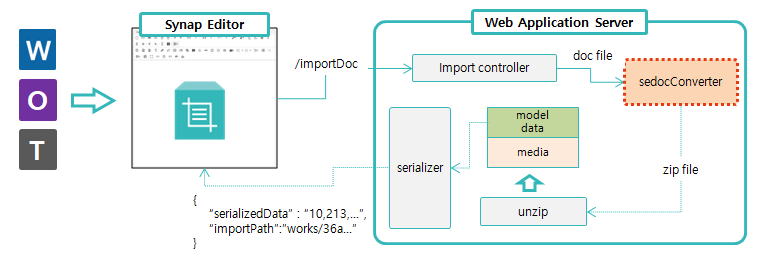
에디터에서 임포트가 실행되면 'editor.import.api'에 지정된 API(예; "/importDoc")로 문서가 전송된다.
이 때 Back-end API 부분은 아래 개발환경 별 Example을 참고하여 직접 구현해야 한다.
After choosing the document to be imported, the Editor sends it to the location designated with 'editor.import.api' key upon configuration (e.g. /importDoc).
The service code for that location (e.g. /importDoc) which is wrapping around 'sedocConverter' , needs to be prepared at the customer side, since the service environment differs from site to site.
Please refer to the link below for a sample implementation.
...
Send document file to be imported via the URL that was configured as 'editor.import.api' property.
| Code Block | ||
|---|---|---|
| ||
Request URL: http://hostname/importDoc
Request Method: POST |
| 키 | 설명 | 필수 | 타입 |
|---|---|---|---|
| file | 임포트할 문서 파일 (multipart/form-data) |
document file to be imported
| O | Binary |
[response]
문서 파일이 정상적으로 변환되면 아래와 같은 응답을 클라이언트로 전송해줘야 한다.
...
| Code Block | ||
|---|---|---|
| ||
{
    "serializedData":[10, 213, 156, ...],
    "importPath": "works/36a43f36f442b5824c6b061eb734553d"
} |
| 키 | 설명 | 타입 |
|---|---|---|
| serializedData | 문서 변환 후 클라이언트에서 사용할 수 있는 형태로 문서 모델을 직렬화 한 데이터 |
serialized document model data that can be consumed by Editor front-end
...
| Array | |
| importPath | 변환된 파일의 압축을 푼 경로 |
path to the directory where the converted files reside
| String |
관련정보
| Children Display |
|---|