릴리즈 3.1.2503 이상
사이냅 에디터에서 제공하는 표 템플릿 스타일 기능을 이용하면 더 빠르고 편리한 표 편집이 가능합니다.
설정
| key | 설명 |
|---|---|
| editor.table.template.styles | 표 템플릿 스타일을 설정합니다. |
| editor.table.template.list | 보여줄 템플릿을 설정합니다. |
editor.table.template.styles 설정
| key | type | 설명 | ||||||
|---|---|---|---|---|---|---|---|---|
| template name | Object | 표 템플릿 스타일을 정의합니다. | ||||||
| row | Object | 행들의 스타일을 정의합니다. | ||||||
head | Object | 머리행의 스타일을 정의합니다. | ||||||
index | Number | 인자로 받은 인덱스에 스타일을 적용할지 여부를 판단합니다. | ||||||
style | Object | css로 표현할 수 있는 스타일을 정의합니다. 기존의 스타일 이외에도 추가할 수 있습니다. | ||||||
color | String | 텍스트 색상 | ||||||
backgroundColor | String | 배경 색상 | ||||||
borders | Object | borders를 정의합니다 | ||||||
| top | Object | border-top 정의 | ||||||
style | String | 테두리 스타일 | ||||||
width | Number | 테두리 두께 | ||||||
color | String | 테두리 색상 | ||||||
| bottom | Object | 형태는 top과 같습니다. 설정하지 않으면 top이 적용됩니다. | ||||||
| left | Object | 형태는 top과 같습니다. 설정하지 않으면 top이 적용됩니다. | ||||||
| right | Object | 형태는 top과 같습니다. 설정하지 않으면 left → top 순서대로 적용됩니다. | ||||||
highlight | Object | 강조행의 스타일을 정의합니다. 형태는 head와 같습니다. | ||||||
| index | Number | 인자로 받은 인덱스에 따라 스타일을 적용할지 여부를 판단합니다. 1: 짝수 | ||||||
col | Object | 열들의 스타일을 정의합니다. 형태는 row와 같습니다. | ||||||
defaultStyle | Object | 기본 셀 스타일을 정의합니다. 형태는 style과 같습니다. | ||||||
tableStyle | Object | 기본 표 스타일을 정의합니다. 형태는 style과 같습니다. | ||||||
editor.table.template.list 설정
| key | type | 설명 | 설정 | |
|---|---|---|---|---|
| popup | ArrayList | 표 생성 팝업에서 보여줄 표 템플릿 리스트를 정의합니다. 이중 배열로 한 줄에 최대 4개의 템플릿을 보여줄 수 있습니다. | popup: [ |
|
| dialog | ArrayList | 표 속성 다이얼로그의 [스타일 & 제목 셀] 탭에서 보여줄 표 템플릿 리스트를 정의합니다. 이중 배열로 한 줄에 최대 4개의 템플릿을 보여줄 수 있습니다. | dialog: [ |
|
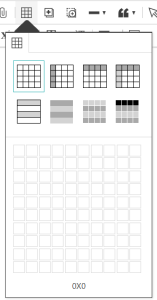
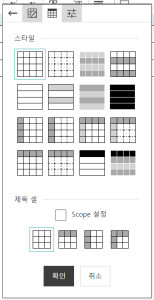
기본 표 템플릿 스타일 종류
| Style | Key | Config | |
|---|---|---|---|
| 1 |
| Basic | 'Basic': {
defaultStyle: {
borders: {
top: {
type: 'solid',
width: 1,
color: 'black',
}
}
}
}
|
| 2 |
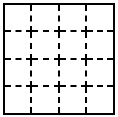
| Dashed | 'Dashed': {
defaultStyle: {
borders: {
top: {
type: 'dashed',
width: 1,
color: 'black'
}
}
},
tableStyle: {
borders: {
top: {
type: 'solid',
width: 1,
color: 'black'
}
}
}
}
|
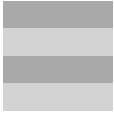
| 3 |
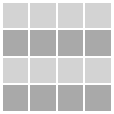
| GrayScale | 'GrayScale': {
row: {
highlight: {
index: 1,
style: {
backgroundColor: 'darkgray',
borders: {
top: {
type: 'solid',
width: 1,
color: 'white'
}
}
}
}
},
defaultStyle: {
backgroundColor: 'lightgray',
borders: {
top: {
type: 'solid',
width: 1,
color: 'white'
}
}
}
}
|
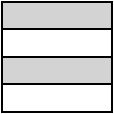
| 4 |
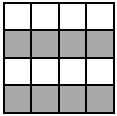
| Zebra | 'Zebra': {
row: {
highlight: {
index: 1,
style: {
backgroundColor: 'darkgray',
borders: {
top: {
type: 'solid',
width: 1,
color: 'black'
}
}
}
}
},
defaultStyle: {
borders: {
top: {
type: 'solid',
width: 1,
color: 'black'
}
}
}
}
|
| 5 |
| Sideless | 'Sideless': {
defaultStyle: {
borders: {
top: {
type: 'solid',
width: 1,
color: 'black'
},
left: {
type: 'none',
width: 0,
color: 'white'
}
}
},
tableStyle: {
borders: {
top: {
type: 'solid',
width: 1,
color: 'black'
}
}
}
}
|
| 6 |
| Sideless Zebra | 'Sideless Zebra': {
row: {
highlight: {
index: 0,
style: {
backgroundColor: 'lightgray',
borders: {
top: {
type: 'solid',
width: 1,
color: 'black'
},
left: {
type: 'none',
width: 0,
color: 'white'
}
}
}
}
},
defaultStyle: {
borders: {
top: {
type: 'solid',
width: 1,
color: 'black'
},
left: {
type: 'none',
width: 0,
color: 'white'
}
}
},
tableStyle: {
borders: {
top: {
type: 'solid',
width: 1,
color: 'black'
}
}
}
}
|
| 7 |
| Sideless GrayScale | 'Sideless GrayScale': {
row: {
highlight: {
index: 0,
style: {
backgroundColor: 'darkgray',
borders: {
top: {
type: 'none',
width: 0,
color: 'white'
}
}
}
}
},
defaultStyle: {
backgroundColor: 'lightgray',
borders: {
top: {
type: 'none',
width: 0,
color: 'white'
}
}
}
}
|
| 8 |
| Sideless Black | 'Sideless Black': {
defaultStyle: {
color: 'white',
backgroundColor: 'black',
borders: {
top: {
type: 'solid',
width: 1,
color: 'white'
},
left: {
type: 'none',
width: 0,
color: 'white'
}
}
}
}
|
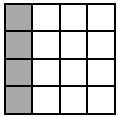
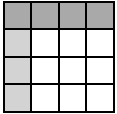
| 9 |
| Gray Column Header | 'Gray Column Header': {
col: {
head: {
index: 0,
style: {
backgroundColor: 'darkgray',
borders: {
top: {
type: 'solid',
width: 1,
color: 'black'
}
}
}
}
},
defaultStyle: {
borders: {
top: {
type: 'solid',
width: 1,
color: 'black'
}
}
}
}
|
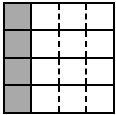
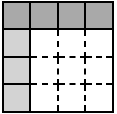
| 10 |
| Dashed Gray Column Header | 'Gray Column Header': {
col: {
head: {
index: 0,
style: {
backgroundColor: 'darkgray',
borders: {
top: {
type: 'solid',
width: 1,
color: 'black'
}
}
}
}
},
defaultStyle: {
borders: {
top: {
type: 'solid',
width: 1,
color: 'black'
}
}
}
}
|
| 11 |
| Dual Header | 'Dual Header': {
row: {
head: {
index: 0,
style: {
backgroundColor: 'darkgray',
borders: {
top: {
type: 'solid',
width: 1,
color: 'black'
}
}
}
}
},
col: {
head: {
index: 0,
style: {
backgroundColor: 'lightgray',
borders: {
top: {
type: 'solid',
width: 1,
color: 'black'
}
}
}
}
},
defaultStyle: {
borders: {
top: {
type: 'solid',
width: 1,
color: 'black'
}
}
}
}
|
| 12 |
| Dashed Dual Header | 'Dashed Dual Header': {
row: {
head: {
index: 0,
style: {
backgroundColor: 'darkgray',
borders: {
top: {
type: 'solid',
width: 1,
color: 'black'
}
}
}
}
},
col: {
head: {
index: 0,
style: {
backgroundColor: 'lightgray',
borders: {
top: {
type: 'solid',
width: 1,
color: 'black'
}
}
}
}
},
defaultStyle: {
borders: {
top: {
type: 'dashed',
width: 1,
color: 'black'
}
}
},
tableStyle: {
borders: {
top: {
type: 'solid',
width: 1,
color: 'black'
}
}
}
}
|
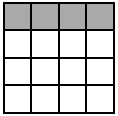
| 13 |
| Gray Row Header | 'Gray Row Header': {
row: {
head: {
index: 0,
style: {
backgroundColor: 'darkgray',
borders: {
top: {
type: 'solid',
width: 1,
color: 'black'
}
}
}
}
},
defaultStyle: {
borders: {
top: {
type: 'solid',
width: 1,
color: 'black'
}
}
}
}
|
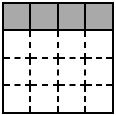
| 14 |
| Dashed Gray Row Header | 'Dashed Gray Row Header': {
row: {
head: {
index: 0,
style: {
backgroundColor: 'darkgray',
borders: {
top: {
type: 'solid',
width: 1,
color: 'black'
}
}
}
}
},
defaultStyle: {
borders: {
top: {
type: 'dashed',
width: 1,
color: 'black'
}
}
},
tableStyle: {
borders: {
top: {
type: 'solid',
width: 1,
color: 'black'
}
}
}
}
|
| 15 |
| Sideless Black Row | 'Sideless Black Row Header': {
row: {
head: {
index: 0,
style: {
color: 'white',
backgroundColor: 'black',
borders: {
top: {
type: 'solid',
width: 1,
color: 'black'
},
left: {
type: 'none',
width: 0,
color: 'white'
}
}
}
}
},
defaultStyle: {
borders: {
top: {
type: 'solid',
width: 1,
color: 'black'
},
left: {
type: 'none',
width: 0,
color: 'white'
}
}
},
tableStyle: {
borders: {
top: {
type: 'solid',
width: 1,
color: 'black'
}
}
}
}
|
| 16 |
| Striped Black Row Header | 'Striped Black Row Header': {
row: {
head: {
index: 0,
style: {
color: 'white',
backgroundColor: 'black',
borders: {
top: {
type: 'solid',
width: 1,
color: 'white'
}
}
}
},
highlight: {
index: 1,
style: {
backgroundColor: 'darkgray',
borders: {
top: {
type: 'solid',
width: 1,
color: 'white'
}
}
}
}
},
defaultStyle: {
backgroundColor: 'lightgray',
borders: {
top: {
type: 'solid',
width: 1,
color: 'white'
}
}
}
}
|

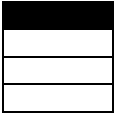
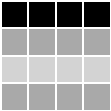
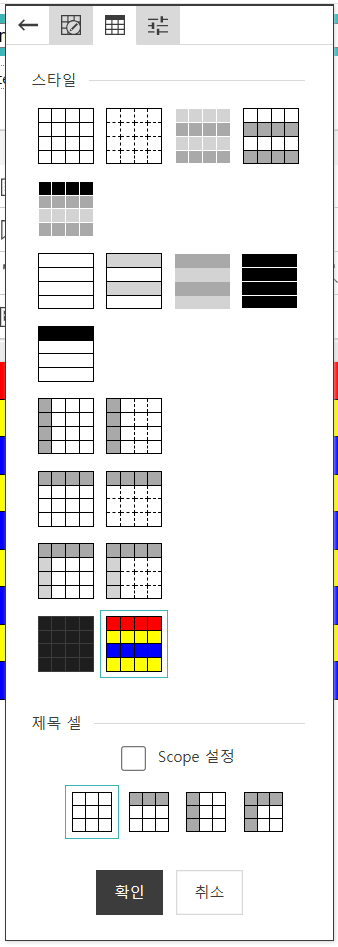
적용 예시
var synapEditorConfig = {
    'editor.table.template.styles': {
        'Dark Mode': {
            defaultStyle: {
                color: 'rgb(220, 220, 220)',
                backgroundColor: 'rgb(30, 30, 30)',
                borders: {
                    top: {
                        type: 'solid',
                        width: 1,
                        color: 'rgb(60, 60, 60)'
                    }
                }
            }
        },
        'Rainbow': {
            row: {
                head: {
                    index: 0,
                    style: {
                        backgroundColor: 'red',
                        borders: {
                            top: {
                                type: 'solid',
                                width: 1,
                                color: 'black'
                            }
                        }
                    }
                },
                highlight: {
                    index: 1,
                    style: {
                        backgroundColor: 'yellow',
                        borders: {
                            top: {
                                type: 'solid',
                                width: 1,
                                color: 'black'
                            }
                        }
                    }
                }
            },
            defaultStyle: {
                color: 'white',
                backgroundColor: 'blue',
                borders: {
                    top: {
                        type: 'solid',
                        width: 1,
                        color: 'black'
                    }
                }
            }
        }
    },
    'editor.table.template.list': {
        popup: [
            ['Basic'],
            ['Dark Mode', 'Rainbow'],
            ['Sideless', 'Sideless Zebra', 'Sideless GrayScale', 'Sideless Black']
        ],
        dialog: [
            ['Basic', 'Dashed', 'GrayScale', 'Zebra'],
            ['Striped Black Row Header'],
            ['Sideless', 'Sideless Zebra', 'Sideless GrayScale', 'Sideless Black'],
            ['Sideless Black Row Header'],
            ['Gray Column Header', 'Dashed Gray Column Header'],
            ['Gray Row Header', 'Dashed Gray Row Header'],
            ['Dual Header', 'Dashed Dual Header'],
            ['Dark Mode', 'Rainbow']
        ]
    }
}
| |
| 표 생성 팝업 | 표 속성 다이얼로그 - [스타일 & 제목 셀] 탭 |
|
|