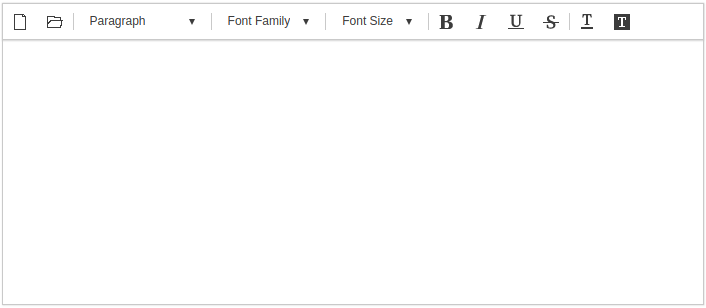
사이냅 에디터의 초기화는 아래와 같이 새 객체를 생성하는 구문으로 간단히 이루어집니다.
new SynapEditor('synapEditor');
추가적인 환경설정은 SynapEditor 객체 생성시에 인자로 명시하거나, 별도의 설정 파일을 통해서도 가능합니다.
객체 생성을 통한 환경설정
window.editor = new SynapEditor('synapEditor', {
	'editor.license': '/resource/license.json',
	'editor.toolbar': ['new','open','|', 'paragraphStyleWithText', '|', 'fontFamilyWithText', '|','fontSizeWithText', '|','bold', 'italic', 'underline', 'strike', '|','fontColor', 'fontBackgroundColor'],
	'editor.size.width': '100%',
	'editor.size.height': '100%',
	'editor.lang.default': 'en',
	'editor.menu.show': false
});
독립적인 config file을 이용한 환경설정
설정 객체 사용방법: 스크립트 추가, 에디터 초기화 config를 설정합니다.
<!DOCTYPE html>
<html lang="ko">
    <script src='synapeditor.config.js'></script>
    <script>
        function initEditor() {
            new SynapEditor('synapEditor', synapEditorConfig);
        }
    </script>
    <body onload="initEditor();">
        <div id="synapEditor"></div>
    </body>
</html>
사이냅 에디터 기본 설정 객체 입니다.
key, value 형태로 설정하며, 사용하지 않는 설정 제거시 기본설정으로 동작합니다.
synapeditor.config.js
var synapEditorConfig = {
	'editor.license': '/resource/license.json',
	'editor.size.width': '100%',
	'editor.size.height': '100%',
	'editor.lang.default': 'en',
	'editor.menu.show': false,
	'editor.toolbar': ['new','open','|', 'paragraphStyleWithText', '|', 'fontFamilyWithText', '|','fontSizeWithText', '|','bold', 'italic', 'underline', 'strike', '|','fontColor', 'fontBackgroundColor']
}
라이센스 설정
라이센스 파일의 경로 또는 라이센스 객체를 설정합니다.
'editor.license' 설정은 필수 설정이며, 미 설정시 에디터가 동작하지 않습니다.
synapeditor.config.js
{
    'editor.license': '/resource/license.json'
}
synapeditor.config.js
{
    'editor.license': {
        'company': 'SynapSoft',
        'key': [
            'licenseKey'
        ]
    }
}
초기화 예시
위와 같은 파라메터들을 설정한 경우 사이냅에디터는 아래와 보입니다.