릴리즈 2.4.0 이상
API
SynapEditor.addPlugin(pluginName, pluginGenerator)
사이냅에디터에 플러그인을 추가합니다.
Params:
Name | Type | Description |
|---|---|---|
| pluginName | string | 플러그인의 이름입니다. |
pluginGenerator | function | 플러그인 객체를 생성해주는 함수입니다. |
Example:
var pluginName = "pluginName";
var pluginGenerator = function (editor) {
	//플러그인 객체를 반환합니다.
	return {
		//...
	};
};
SynapEditor.addPlugin(pluginName, pluginGenerator); // 플러그인 추가하기, 사이냅에디터 생성 전 추가되어야 합니다.

...
new SynapEditor(editorId, synapEditorconfig, ...); // 에디터 생성
플러그인 객체의 형태
| 속성 | 타입 | 설명 | 속성 정의 |
|---|---|---|---|
| buttonDef | Array | Object | 툴바 영역 또는 메뉴 영역에 버튼을 추가하기 위한 버튼 정의를 설정합니다.
| Array 형태 buttonDef: [{
name: '버튼의 이름', // 버튼이 2개 이상인 경우 반드시 있어야 합니다. UI에 추가할 때는 각 버튼의 이름을 사용하면 됩니다.
label: '버튼에 보여질 텍스트',
iconSVG: '버튼의 아이콘으로 사용될 SVG 태그',
onClickFunc: function () {
//버튼이 클릭되었을 때 실행될 함수
}
}, ...]
Object 형태 buttonDef: {
name: '버튼의 이름', // 버튼이 1개인 경우 설정하지 않아도 됩니다. 설정하지 않은 경우 플러그인의 이름으로 자동으로 설정되어 UI에 추가할 때는 플러그인 이름을 사용해 추가하고, 버튼 이름을 설정한 경우에는 설정한 버튼의 이름으로 추가합니다.
label: '버튼에 보여질 텍스트',
iconSVG: '버튼의 아이콘으로 사용될 SVG 태그',
onClickFunc: function () {
//버튼이 클릭되었을 때 실행될 함수
}
}
|
| shortcutDef | Array | Object | 단축키를 추가하기 위한 정의를 설정합니다.
| Array 형태 shortcutDef: [{
key: {
windows: '윈도우에서 사용할 단축키',
mac: '맥에서 사용할 단축키'
},
option: {
action: '에디터 액션 이름',
params: ['에디터 액션 파라미터 1', ...],
focusIme: true or false //단축키 동작 후 에디터 포커스 설정 여부
}
}, ...]
Object 형태 shortcutDef: {
key: {
windows: '윈도우에서 사용할 단축키',
mac: '맥에서 사용할 단축키'
},
option: {
action: '에디터 액션 이름',
params: ['에디터 액션 파라미터 1', ...],
focusIme: true or false //단축키 동작 후 에디터 포커스 설정 여부
}
}
|
| dialogs | CustomDialog[] |
예제
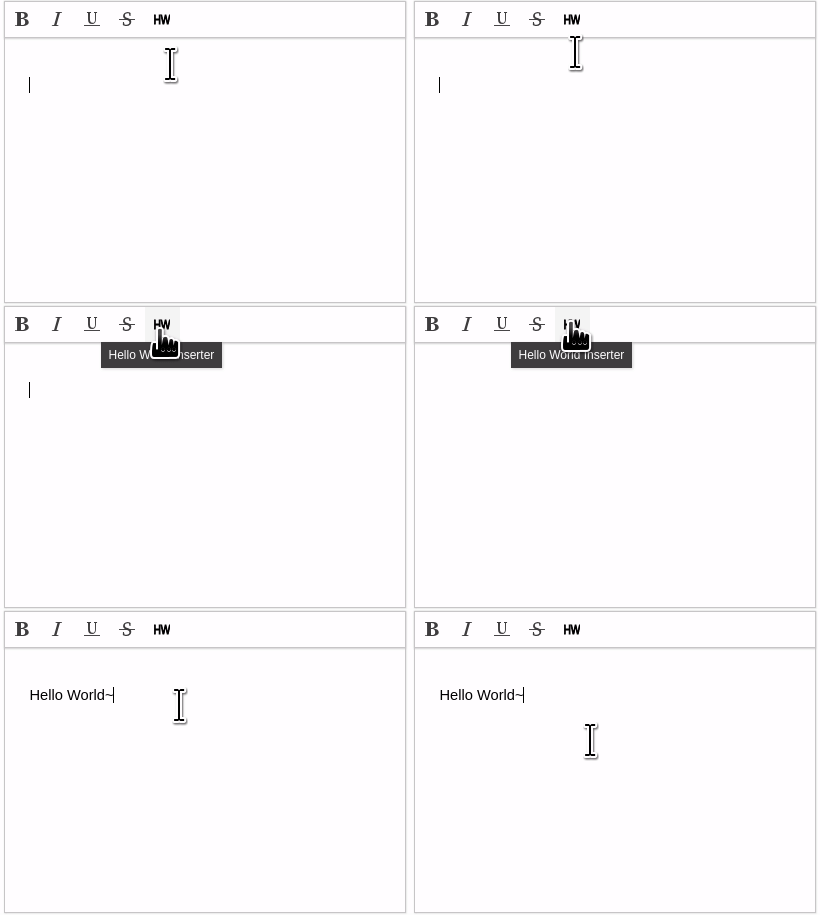
'Hello World~'를 에디터에 삽입하는 플러그인
PluginGenerator 정의
./plugins/helloWorldInserter.js
var pluginName = "helloWorldInserter";
var pluginGenerator = function(editor) {
    return {
        buttonDef: {
            label: 'Hello World Inserter',
            iconSVG: `<svg xmlns="http://www.w3.org/2000/svg" version="1.1" viewBox="0 0 16 16">
                        <g xmlns="http://www.w3.org/2000/svg"><title>Layer 1</title>
                            <text stroke="#000000" transform="matrix(0.7835232019424438,0,0,1,0.2672135476022959,0) " xml:space="preserve"
                                    text-anchor="start" font-family="Helvetica, Arial, sans-serif" font-size="13" y="12.580528" x="-1.056391" fill="#000000">HW</text>
                        </g>
                 </svg>`,
            onClickFunc: function () {
                editor.execCommand('insertText', 'Hello World~');
            }
        }
    };
};

SynapEditor.addPlugin(pluginName, pluginGenerator); // 에디터 생성 전에 추가

...
new SynapEditor(editorId, synapEditorconfig, ...); // 에디터 생성
작성한 플러그인 로드
./index.html
<!-- synapeditor plugin -->
<script type="text/javascript" src="./plugins/helloWorldInserter.js"></script>
에디터 툴바 영역에 플러그인 버튼 달기
./synapeditor.config.js
"editor.toolbar": ["bold", "italic", "underline", "strike", "helloWorldInserter"] //helloWorldInserter 플러그인을 툴바 영역에 설정합니다.
결과