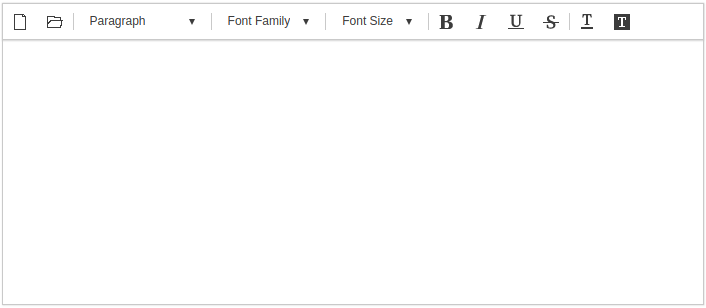
사이냅 에디터의 초기화는 아래와 같이 새 객체를 생성하는 구문으로 간단히 이루어집니다The initialization of the Synap Editor is simple as shown below.
| Code Block | ||||
|---|---|---|---|---|
| ||||
new SynapEditor('synapEditor'); |
추가적인 환경설정은 SynapEditor 객체 생성시에 인자로 명시하거나, 별도의 설정 파일을 통해서도 가능합니다.
...
Additional preferences can be specified as arguments when creating the editor object, or through a separate configuration file.
Configuring the Editor on object creation
| Code Block | ||||
|---|---|---|---|---|
| ||||
window.editor = new SynapEditor('synapEditor', {
	'editor.license': '/resource/license.json',
	'editor.toolbar': ['new','open','|', 'paragraphStyleWithText', '|', 'fontFamilyWithText', '|','fontSizeWithText', '|','bold', 'italic', 'underline', 'strike', '|','fontColor', 'fontBackgroundColor'],
	'editor.size.width': '100%',
	'editor.size.height': '100%',
	'editor.lang.default': 'en',
	'editor.menu.show': false
}); |
...
Configuring the Editor via separate config file
설정 객체 사용방법: 스크립트 추가, 에디터 초기화 config를 설정합니다.
...
| Code Block | ||||||
|---|---|---|---|---|---|---|
| ||||||
var synapEditorConfig = {
	'editor.license': '/resource/license.json',
	'editor.size.width': '100%',
	'editor.size.height': '100%',
	'editor.lang.default': 'en',
	'editor.menu.show': false,
	'editor.toolbar': ['new','open','|', 'paragraphStyleWithText', '|', 'fontFamilyWithText', '|','fontSizeWithText', '|','bold', 'italic', 'underline', 'strike', '|','fontColor', 'fontBackgroundColor']
}
|
라이센스 설정
라이센스 파일의 경로 또는 라이센스 객체를 설정합니다.
Setting Lincense
Set the path or license object for the license file.
The 'editor.license' 설정은 필수 설정이며, 미 설정시 에디터가 동작하지 않습니다setting is required, and the editor will not work if it is not set.
| Code Block | ||||||
|---|---|---|---|---|---|---|
| ||||||
{
    'editor.license': '/resource/license.json'
}
|
...
| Code Block | ||||||
|---|---|---|---|---|---|---|
| ||||||
{
    'editor.license': {
        'company': 'SynapSoft',
        'key': [
            'licenseKey'
        ]
    }
}
|
초기화 예시
...
Sample initialization result
If the parameters above are used, the Editor will look like this: