PARAGRAPH EDIT
Paragraph-related commands executed via editor.execCommand — paragraph properties, alignment, indentation, quoting, and list management.
Commands
command - addParagraphPropertiescommand - aligncommand - decreaseIndentcommand - decreaseQuotecommand - increaseIndentcommand - increaseQuotecommand - insertHTMLcommand - setBulletListcommand - setCustomListcommand - setLineHeightcommand - setListStartValuecommand - setMultiListcommand - setNumberedListcommand - setParaTagNamecommand - toggleList
All commands operate on the paragraph at the caret. When a selection covers multiple paragraphs, the command applies to every paragraph in the selection.
command - addParagraphProperties
Sets properties on the current paragraph (id, className, inline style).
| Name | Type | Description |
|---|---|---|
actionName | string | Action name |
properties | object | { id?: string, className?: string, style?: object } |
editor.execCommand('addParagraphProperties', { id: 'paragraph-id' });
editor.execCommand('addParagraphProperties', { className: 'custom-class-name' });
editor.execCommand('addParagraphProperties', { style: { margin: { top: 20, left: 20 } } });
editor.execCommand('addParagraphProperties', { style: { padding: { bottom: 30, right: 30 } } });
command - align
Sets paragraph alignment.
| Name | Type | Description |
|---|---|---|
actionName | string | Action name |
value | string | 'left', 'center', 'right', 'justify' |
editor.execCommand('align', 'left');
editor.execCommand('align', 'center');
editor.execCommand('align', 'right');
editor.execCommand('align', 'justify');
command - decreaseIndent
Decreases the paragraph indent (outdent).
| Name | Type | Description |
|---|---|---|
actionName | string | Action name |
editor.execCommand('decreaseIndent');
command - decreaseQuote
Removes the blockquote from the current paragraph (if any).
| Name | Type | Description |
|---|---|---|
actionName | string | Action name |
editor.execCommand('decreaseQuote');
command - increaseIndent
Increases the paragraph indent.
| Name | Type | Description |
|---|---|---|
actionName | string | Action name |
editor.execCommand('increaseIndent');
command - increaseQuote
Wraps the current paragraph in a blockquote.
| Name | Type | Description |
|---|---|---|
actionName | string | Action name |
properties | object | { id?: string, className?: string, style?: object } |
editor.execCommand('increaseQuote');                                                                  // plain blockquote
editor.execCommand('increaseQuote', { style: { backgroundColor: { r: 255, g: 0, b: 0 } } });          // with background color
editor.execCommand('increaseQuote', { className: 'custom-class-name' });                              // with class
command - insertHTML
Release 2.17.0+
Inserts HTML at the caret. When a selection exists, insertType controls how the HTML is placed.
| Name | Type | Description |
|---|---|---|
actionName | string | Action name |
html | string | HTML to insert |
insertType | string | 'overwrite' (replace selection), 'before' (insert before selection), 'after' (insert after selection) |
overwriteStyle | boolean | Whether to overwrite the existing text style (default false) |
editor.execCommand('insertHTML', '<span>Editor</span>');
editor.execCommand('insertHTML', '<span>Editor</span>', 'overwrite');
editor.execCommand('insertHTML', '<span>Editor</span>', 'before');
editor.execCommand('insertHTML', '<span>Editor</span>', 'after');
command - setBulletList
Sets a bullet-style list on the paragraph.
| Name | Type | Description |
|---|---|---|
actionName | string | Action name |
text | string | Bullet character (e.g. '●', '○', '■', '◆', '-') |
editor.execCommand('setBulletList', '-');
editor.execCommand('setBulletList', '●');
command - setCustomList
Release 3.2.2509+, Release 2.20.2509+
Applies a custom list style. If customListInfo is omitted, the config-level editor.list.customList setting is used.
| Name | Type | Description |
|---|---|---|
actionName | string | Action name |
customListInfo | array | Custom list level definitions. See Custom Bullets. |
editor.execCommand('setCustomList', [
    {
        format: 'bullet',
        levelText: 'A',
        runStyle: {
            color: 'red',
            fontSize: { value: 16, unit: 'pt' },
            italic: true,
            fontWeight: 700,
        }
    },
    {
        format: 'bullet',
        levelText: 'B',
        runStyle: {
            color: 'blue',
            fontSize: { value: 16, unit: 'pt' },
            italic: true,
            fontWeight: 700,
        }
    },
    {
        format: 'bullet',
        levelText: 'C',
        runStyle: {
            color: 'green',
            fontSize: { value: 16, unit: 'pt' },
            italic: true,
            fontWeight: 700,
        }
    },
    {
        format: 'bullet',
        levelText: 'D',
        runStyle: {
            color: 'orange',
            fontSize: { value: 16, unit: 'pt' },
            italic: true,
            fontWeight: 700,
        }
    },
    {
        format: 'bullet',
        levelText: 'E',
        runStyle: {
            color: 'purple',
            fontSize: { value: 16, unit: 'pt' },
            italic: true,
            fontWeight: 700,
        }
    },
    {
        format: 'bullet',
        levelText: 'F',
        runStyle: {
            color: 'brown',
            fontSize: { value: 16, unit: 'pt' },
            italic: true,
            fontWeight: 700,
        }
    },
    {
        format: 'bullet',
        levelText: 'G',
        runStyle: {
            color: 'magenta',
            fontSize: { value: 16, unit: 'pt' },
            italic: true,
            fontWeight: 700,
        }
    },
    {
        format: 'bullet',
        levelText: 'H',
        runStyle: {
            color: 'teal',
            fontSize: { value: 16, unit: 'pt' },
            italic: true,
            fontWeight: 700,
        }
    },
    {
        format: 'bullet',
        levelText: 'I',
        runStyle: {
            color: 'navy',
            fontSize: { value: 16, unit: 'pt' },
            italic: true,
            fontWeight: 700,
        }
    }
]);
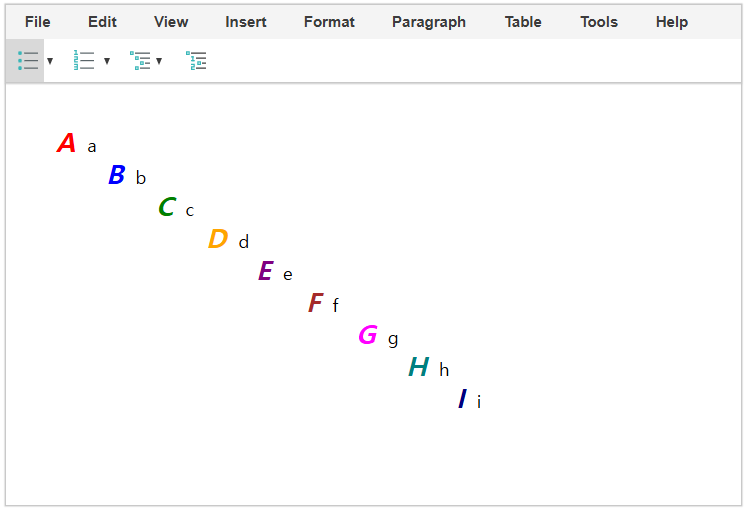
command - setLineHeight
Sets the line height of the paragraph.
| Name | Type | Description |
|---|---|---|
actionName | string | Action name |
lineHeight | object | { value: Number, unit: string } — unit is '', '%', or 'px' |
editor.execCommand('setLineHeight', { value: 1.6, unit: '' });   // line height 1.6
editor.execCommand('setLineHeight', { value: 150, unit: '%' });  // line height 150%
editor.execCommand('setLineHeight', { value: 20,  unit: 'px' }); // line height 20px
command - setListStartValue
Sets the starting number for a numbered list in the current paragraph.
| Name | Type | Description |
|---|---|---|
actionName | string | Action name |
value | number | Starting number |
editor.execCommand('setListStartValue', 10);
editor.execCommand('setListStartValue', 999);
command - setMultiList
Sets a multilevel list style on the paragraph.
| Name | Type | Description |
|---|---|---|
actionName | string | Action name |
style | string | 'none' to remove, or 'multi_1' / 'multi_2' / 'multi_3' / 'multi_4' / 'multi_5' (see Multilevel Bullet Number) |
editor.execCommand('setMultiList', 'none');
editor.execCommand('setMultiList', 'multi_1');
command - setNumberedList
Sets a numbered-list format on the paragraph.
| Name | Type | Description |
|---|---|---|
actionName | string | Action name |
format | string | One of 'decimal' (1. 2. 3.), 'decimalEnclosedCircle' (① ② ③), 'upperLetter' (A. B. C.), 'lowerLetter' (a. b. c.), 'upperRoman' (I. II. III.), 'lowerRoman' (i. ii. iii.), 'ganada' (가. 나. 다.), 'chosung' (ㄱ. ㄴ. ㄷ.) |
editor.execCommand('setNumberedList', 'decimal');
editor.execCommand('setNumberedList', 'decimalEnclosedCircle');
editor.execCommand('setNumberedList', 'ganada');
command - setParaTagName
Sets the tag name of the current paragraph.
| Name | Type | Description |
|---|---|---|
actionName | string | Action name |
value | string | 'P', 'H1', 'H2', 'H3', 'H4', 'H5', 'H6' |
// Release 3.2.2509+, Release 2.20.2509+
editor.execCommand('setParaTagName', 'P');
editor.execCommand('setParaTagName', 'H1');
editor.execCommand('setParaTagName', 'H2');

// Earlier releases used `setTagName`
editor.execCommand('setTagName', 'P');
editor.execCommand('setTagName', 'H1');
command - toggleList
Toggles a bullet or numbered list on the current paragraph.
| Name | Type | Description |
|---|---|---|
actionName | string | Action name |
type | string | 'bullet' or 'number' |
editor.execCommand('toggleList', 'bullet');
editor.execCommand('toggleList', 'number');